This is a static, read-only archive of Wireshark Q&A. Older questions and answers from October 2017 and earlier can be found at osqa-ask.wireshark.org.
0

How to verify what protocol was used in an encrypted file transfer?

asked Nov 29 '17

updated Nov 29 '17

We have a transfer which uses IBM's Connect:Direct aka NDM. IBM says the transfer uses TLS1.2, and the log for the transfer also shows TLS1.2 and the cipher used.

I traced this using Wireshark, and I only see "SSL" in the protocol where I am expecting to see TLS1.2 and cipher.

I have already added the ports used at the following location: edit--> preferences -->http: SSL/TLS Ports

When using other applications (with proper ports added), I am able to see TLS1.2 is used in the trace.

Is it possible this is not actually using TLS1.2? Or do I need to add the ports to another protocol? I raised a ticket with IBM and they said if the debug shows TLS1.2, then that is what was used. Any help would be much appreciated.

Thanks,

mredd22
Comments

Can you share the capture, or at least a part of it with the TLS handshake frames?

User 98587 ( Nov 29 '17 )

Hi grahamb and thank you for your response.

I am restricted from sharing this. I would include a screenshot of the Protocol and Info columns to show what I am seeing vs what I think I should see, but I am too green on this site to upload files yet.

They probably wouldn't have been helpful anyways, but would appreciate any thoughts or ideas. Thank you!

User 72377 ( Nov 29 '17 )

Analysis via text or screenshot is always painful. What we would need to see are the contents of the TLS handshake. You can see these in the example traffic as shown on the SSL Wiki page. We only need the expanded contents of the SSL Layer from the tree.

You can use tshark on the command line to output the required text, use tshark -r your_capture -Y ssl -O ssl > ssl.txt and then post the contents of ssl.txt by editing your question.

User 98587 ( Nov 29 '17 )

grahamb, thank you for offering to help! I'll have to look into tshark, as I've never heard of it. Matthias' answer works for me

User 72377 ( Dec 05 '17 )

1 Answer

0

answered Dec 03 '17

updated Dec 03 '17

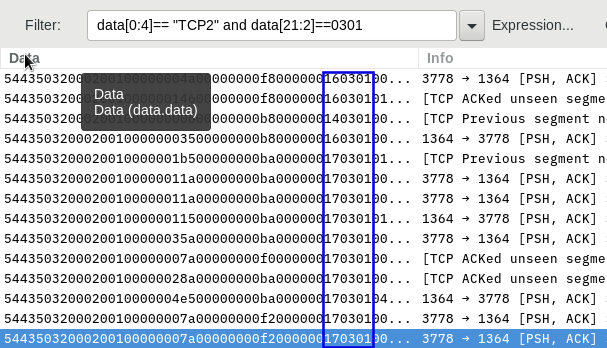
The TCP payload of NDM packets doesn't start with a SSL record.
C:D adds a 20 byte header in front of the SSL records.
This is why wireshark cannot dissect the SSL record at offset 0 after the TCP header. image description

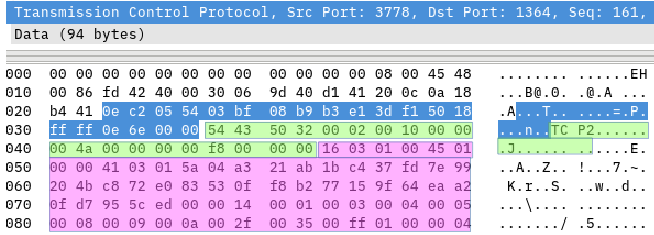
In this case the session is using TLS1.0

image description

If you are interested in the SSL/TLS Version being used only you can create a coloring rule to give you a hint.

@C:D TLS1.2@data[0:4]== "TCP2" and data[21:2]==0303@[56198,46230,57775][0,0,0]
@C:D TLS1.1@data[0:4]== "TCP2" and data[21:2]==0302@[56198,46230,57775][0,0,0]
@C:D TLS1.0@data[0:4]== "TCP2" and data[21:2]==0301@[56198,46230,57775][0,0,0]
@C:D SSL_V3@data[0:4]== "TCP2" and data[21:2]==0300@[56198,46230,57775][0,0,0]

Regards Matthias

Comments

Matthias,

This is perfect, thank you! Also, we did appreciate your San Antonio SHARE presentations last year!

Thanks,

mredd22

User 72377 ( Dec 05 '17 )

Glad you liked it - Say Hi to Marc .L ;-)

User 66275 ( Dec 06 '17 )

Now that NDM supports TLS1.3, I wanted to verify via a Wireshark trace that TLS1.3 was used in an NDM transfer.

Since TLS 1.3 messages disguise themselves as TLS 1.2 messages in the version field, I had to point to what I think is the new "Extension: supported_versions" field. For NDM, I found it only appears on a single packet in the data[73.2] location.

Using the rules Matthias gave above, I added this rule to the top:

@C:D TLS1.3@data[0:4]== "TCP2" and data[21:2]==0303 and data[73:2]==0304@[4626,57825,4626][0,0,0]

@User 66275, do you have a better way to accomplish identifying TLS1.3 packets in Wireshark? :)

User 72377 ( Mar 16 '22 )

Hi @User 66275,

The rules you gave me years ago do not appear to work in the latest version of Wireshark. Do you happen to have another solution for this that you can share?

Thank you,

mredd22

User 72377 ( Apr 16 '26 )

Have you tried separating the hex bytes with a :?
data[21:2]==03:03

WSUG: 6.4.4. Slice Operator
eth.src[0:3] == 00:00:83

User 2763 ( Apr 17 '26 )

Combination of CyberChef OCR and me tweaking the results.
The image above is truncated so hex data is short resulting in IPv4 total length exceeds packet length (130 bytes)

0000 00 00 00 00 00 00 00 00  00 00 00 00 08 00 45 48
0010 00 86 fd 42 40 00 30 06  9d 40 d1 41 20 0c 0a 18
0020 b4 41 0e c2 05 54 03 bf  08 b9 b3 e1 3d f1 50 18
0030 ff ff 0e 6e 00 00 54 43  50 32 00 02 00 10 00 00
0040 00 4a 00 00 00 00 f8 00  00 00 16 03 01 00 45 01
0050 00 00 41 03 01 5a 04 a3  21 ab 1b c4 37 fd 7e 99
0060 20 4b c8 72 e0 83 53 0f  f8 b2 77 15 9f 64 ea a2
0070 0f d7 95 5c ed 00 00 14  00 01 00 03 00 04 00 05
0080 00 08 00 09 00 0a 00 2f  00 35 00 ff 01 00 00 04
User 2763 ( Apr 17 '26 )
cc-by-sa Content on this site is licensed under a Creative Commons Attribution Share Alike 3.0 license.