WSUG: 2.8. Updating Wireshark
Updating Wireshark is done the same way as installing it. ... and all your personal settings will remain unchanged.
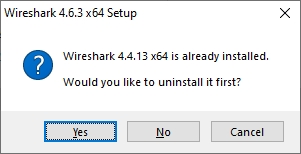
If the installer is allowed to remove the existing version, it does a silent (/S) uninstall which nukes the global plugin directory.
packaging/nsis/wireshark.nsi:
Section "Un.Plugins" un.SecPlugins
;-------------------------------------------
SectionIn 1 2
;Delete "$INSTDIR\plugins\${VERSION}\*.*"
;Delete "$INSTDIR\plugins\*.*"
;RMDir "$INSTDIR\plugins\${VERSION}"
;RMDir "$INSTDIR\plugins"
RMDir /r "$INSTDIR\plugins"
SectionEnd
WSUG: 2.3.8. Uninstall Wireshark
You can uninstall Wireshark using the Programs and Features control panel. Select the “Wireshark” entry to start the uninstallation procedure.
The Wireshark uninstaller provides several options for removal. The default is to remove the core components but keep your personal settings and Npcap. Npcap is kept in case other programs need it.
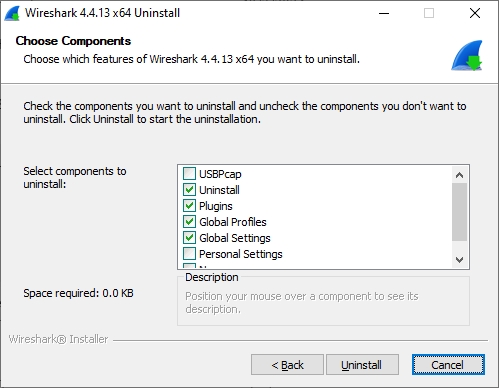
If the existing version is manually uninstalled, there are options of what to preserve.
packaging/nsis/wireshark.nsi:
!insertmacro MUI_UNFUNCTION_DESCRIPTION_BEGIN
  !insertmacro MUI_DESCRIPTION_TEXT ${un.SecUinstall} "Uninstall all ${PROGRAM_NAME} components."
  !insertmacro MUI_DESCRIPTION_TEXT ${un.SecPlugins} "Uninstall all Plugins (even from previous ${PROGRAM_NAME} versions)."
  !insertmacro MUI_DESCRIPTION_TEXT ${un.SecProfiles} "Uninstall all global configuration profiles."
  !insertmacro MUI_DESCRIPTION_TEXT ${un.SecGlobalSettings} "Uninstall global settings like: $INSTDIR\cfilters"
  !insertmacro MUI_DESCRIPTION_TEXT ${un.SecPersonalSettings} "Delete personal configuration folder: $APPDATA\${PROGRAM_NAME}."
  !insertmacro MUI_DESCRIPTION_TEXT ${un.SecNpcap} "Call Npcap's uninstall program."
  !insertmacro MUI_DESCRIPTION_TEXT ${un.SecUSBPcap} "Call USBPcap's uninstall program."
!insertmacro MUI_UNFUNCTION_DESCRIPTION_END


Which plugin folder?
Hi,
this one: "C:\Program Files\Wireshark\plugins"
BR Icebear
https://www.wireshark.org/docs/wsdg_h...
Scripts in personal Lua plugins directory are preserved across updates.